Keep what
you learn.
Make flashcards or import your Anki decks.
Build a lasting memory with spaced repetition.
Sample card 1 of 3. What is the capital of France? Reveal the answer when you are ready.
LESS FRICTION. MORE LEARNING.
A clear space.
For a curious mind.
Make flashcards for whatever you’re learning.
THE SCIENCE OF REMEMBERING
Learn it today.
Know it tomorrow.
Reading something once is a start. Remembering it takes a little practice, at the right time. That’s where spaced repetition comes in.
- 01
Recall, then reveal.
Try to find the answer in your memory before turning the card. That’s active recall.
- 02
A schedule that learns with you.
Rate how well you remembered. FSRS uses your feedback to plan when to review again.
- 03
Let the intervals grow.
As a card becomes familiar, reviews can move further apart. Keep your attention on what needs it.
As recall gets stronger, reviews can move further apart.
A FRESH START. A FAMILIAR DECK.
Love your Anki decks.
Love studying them, too.
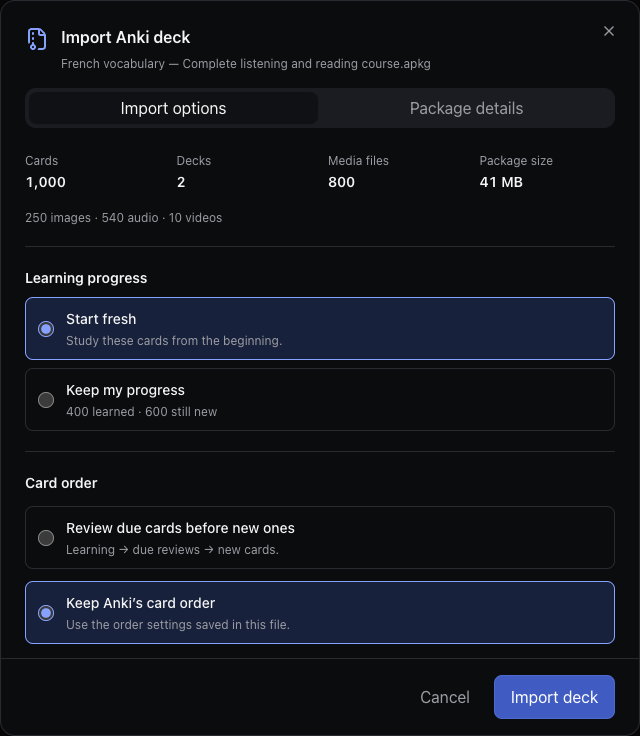
You’ve put time into your cards. Bring them to a modern Anki alternative with a calmer interface. Import an .apkg or CSV file, preview what’s inside, and choose what comes with you.
LOCAL FIRST. LIFE FRIENDLY.
Your train can lose signal.
Your review can keep going.
Once you’re signed in, the cards on your device stay ready for offline study. Export your card content when you need it. Use cloud sync separately when it’s available for your account.
A few things worth knowingA LITTLE CLARITY
Good questions.
What is spaced repetition?
Review a little today so you can remember more tomorrow. After each card, tell Remembr how well you remembered it. Your schedule adapts, bringing difficult cards back sooner and leaving more time between reviews of familiar ones.
Will my review progress come with me?
When you import a compatible deck, you can choose “Keep progress” or start fresh. Progress can currently be kept for supported FSRS review cards. The import preview shows what will carry over; learning steps and suspended or buried cards aren’t included yet.
Can I study offline?
Yes. Once you’re signed in and your cards are on the device, you can keep reviewing if your connection drops. Reconnect when you need to sign in or sync, and back up your cards before clearing browser storage.
Do I need an account? Is it free?
An account is required. Creating cards, importing decks, and studying on your device are free. Cloud sync is available separately for accounts that have it enabled. You can try the sample review on this page without signing up.
Which devices can I use?
The web app works on desktop, phones, and tablets. The Mac beta is available as a direct download for Apple silicon Macs with macOS 13 or later. The Windows beta supports Windows 10 or later on x64 PCs. Native iOS and Android apps are planned. To move a library between devices, use cloud sync when enabled for your account or import your decks on the new device.
Can I export my cards?
Yes. Export your card content as CSV or download the original Anki packages you imported. CSV exports don’t include media or review history, so they aren’t a complete library backup.